In most forms throughout the system, an option exists to Open the data available in the form in Excel. Using this functionality, a user will be able to view and manipulate data which is visible in the form by making use of Excel. This functionality has two underlying components:
- The first component of this is a data entity which is enabled to expose data through the OData feed. By default, the data entities which have a matching primary data source that matches with that of the form will be automatically shown as options.
- Secondly, the Microsoft Dynamics 365 add-in must be installed on the local Excel application. Using this, the user will be able to log-in with credentials which have access on the environment in order to access data. It is important to note that only data which the user has access to will be able to be seen/manipulated through the Excel add-in.
Now that we have a basic understanding of how this works, there may be some scenarios where another data entity must be added as an option to the Open in Excel list. In order to do so, there are a few steps that need to be done. In this scenario, the requirement is to add the CategoryEntity data entity to the ProjCategory form.
Firstly, we must create a class which will store our initlializing handler for the Open in Excel options. Within this class we must have a method with the following signature:
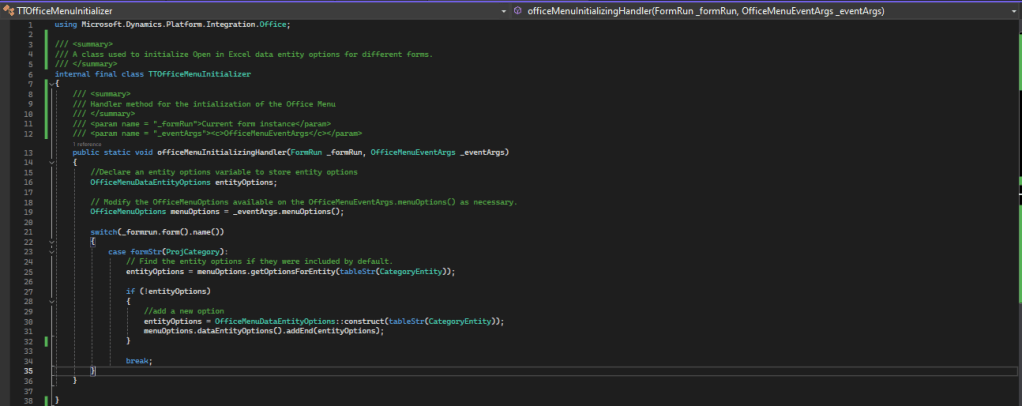
As we can see in the screenshot above, this logic will get the current available list of options and, if the option does not exist, it will add it.
It is very important that the class references the Office library otherwise this will not compile. This can be used by defining an import statement at the top of the class using the following code:
using Microsoft.Dynamics.Platform.Integration.Office;A similar approach can be used if an option needs to be removed. In this case, the logic within the switch statement would be as follows:
/*
If we want to remove options from the list we need to use the following code. In this case
only options linked to the CategoryEntity will be removed.
*/

ListIterator dataEntityOptionsIterator = new ListIterator(menuOptions.dataEntityOptions());

while (dataEntityOptionsIterator.more())
{
    OfficeMenuDataEntityOptions curOption =       dataEntityOptionsIterator.value();

    if(curOption.dataEntityName() == tableStr(CategoryEntity))
    {
        dataEntityOptionsIterator.delete();
    }
}
After this is done, one additional step remains. In order to get our changes to take affect on the form, we need to implement on OnInitializing event for the form with the following logic:
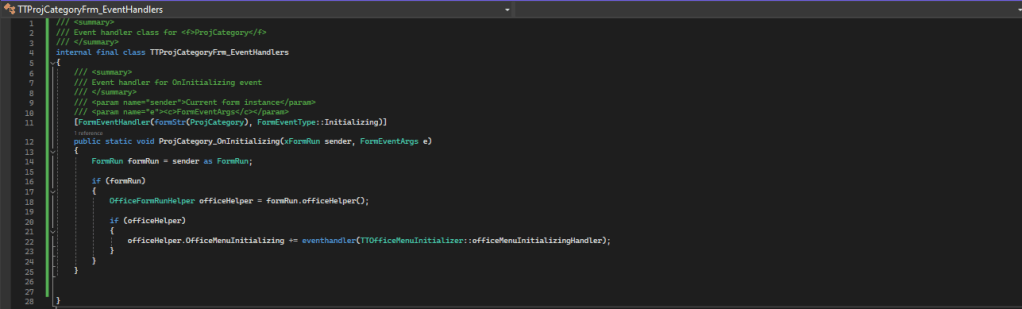
This code will subscribe the previously created options initializer with the initialization event of the form.
That’s it! After a full compilation the changes will be seen on the form.
 d365techtips
Leave a comment