There are many scenarios throughout the development and support process in Dynamics 365 F&O where a developer is faced with a situation where some warning or error message is blocking a certain functionality from working as expected. In cases like these, the developer is tasked with finding the origin of the messages as well as all the configurations that may affect this logic. In this post we will be going through how to start from a warning, error of info message and arrive at the root of the message.
Starting off, all messages displayed on the User Interface are all dispatched using the Info class. Since this class makes part of the Application Platform model, all models which make part of the product make use of this class to show messages on screen. The info(), warning() and error() Global methods all make use of this class.

The trigger point for adding messages to the Infolog is the add() method. Here we can place a breakpoint and be assured that it will be hit whenever a message needs to be displayed.

Let’s say that we need to investigate the following error message shown when trying to access the ‘Employee self service’ and what configuration can be done to rectify it.

Although the message is quite clear as to what can be done, upon the message being shown we can see that the breakpoint that was previously set is now hit.
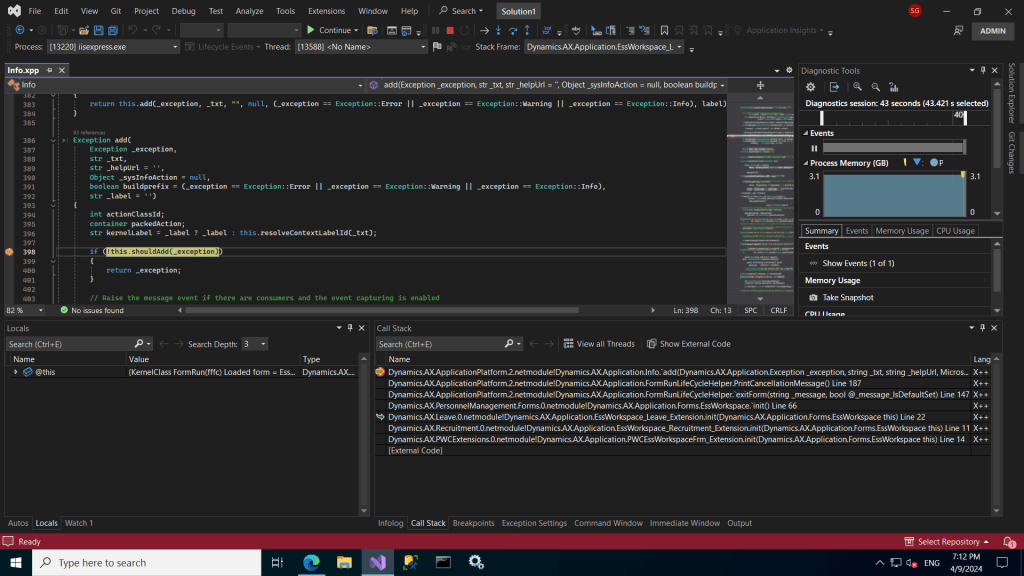
As can be seen in the above screenshot, other than the details related to the current message, we’re also able to see the full stack trace of all the methods which were called to arrive to this point. It is here that we identify where and what needs to be modified or configured in order to resolve this issue.
Throughout this post we’ve been able to identify a way with which a developer can easily identify the origin of an error messages. Hopefully this can help in the situation where an error message presents itself without a proper explanation.
 d365techtips
Leave a comment